Acquiring a Clear Key from BitLocker When Protection Is Suspended
BitLocker is a Windows disk-encryption feature designed to prevent unauthorized offline access to data stored on a drive. It is therefore particularly useful for protecting data if a device is lost or stolen.
1. Identifying BitLocker Encryption
The NTFS BR area typically contains the string NTFS as the OEM ID in its header.
 On a BitLocker-encrypted volume, however, the string FVE-FS (Full Volume Encryption File System) can be identified instead.
 # 2. Keys
FVEK (Full Volume Encryption Key)
The FVEK is a 256-bit key used to encrypt the actual volume data. It is itself encrypted with the VMK and stored on the disk.
The encrypted FVEK is stored in the BitLocker metadata.
VMK (Volume Master Key)
The VMK is used to encrypt the FVEK. Like the FVEK, it is stored in the BitLocker metadata in encrypted form.
The VMK is protected by a Protector.
The key length depends on the encryption method in use.
- AES 128-bit: 128 bits
- AES 256-bit: 256 bits
Recovery Key
The Recovery Key is a 48-digit numeric value used to unlock encrypted data. Each component is divisible by 11 with no remainder.
Dividing each component by 11 yields a 16-bit value; together, these values form a 128-bit key.
When BitLocker protection is suspended, this value can be obtained along with the Clear Key.
Clear Key
When BitLocker protection is suspended, the Clear Key is a 256-bit key stored in the BitLocker metadata area that can be used to decrypt the encrypted disk.
When BitLocker protection is resumed, the Clear Key is removed.
On recent versions of Windows, a disk may already be BitLocker-encrypted after installation. Although the disk remains encrypted, the Clear Key can be acquired while protection is suspended.
Startup Key
A Startup Key is stored on a USB drive, which must be inserted each time the computer is started.
The Startup Key is stored in a file with the .Bek extension.
3. Types of BitLocker Protectors
- TPM (Trusted Platform Module chip)
- The encrypted drive can be accessed as long as it remains associated with the motherboard containing the TPM and system boot integrity is preserved.
- TPM+PIN
- Startup key (on a USB drive)
- TPM+PIN+Startup key
- TPM+Startup key
- Password
- Recovery key (numerical password; on a USB drive)
- Recovery password (on a USB drive)
- Active Directory Domain Services (AD DS) account
- Clear Key
4. BitLocker Encryption Structure
사용자 데이터
   ↑ FVEK로 암호화

FVEK
   ↑ VMK로 암호화

VMK
   ↑ TPM, PIN, 복구 암호, Clear Key 등 Protector(보호기)로 보호
5. BitLocker Decryption Process
-
The Protector decrypts the encrypted VMK.
-
The decrypted VMK is then used to decrypt the FVEK.
-
The decrypted FVEK is then used to decrypt the encrypted disk.
The method used to decrypt the VMK depends on the Protector type. Depending on the configuration, the process may involve the TPM, user input, a key, or another protection mechanism.
 # 6. Practical Exercise: Acquiring the Clear Key
If BitLocker protection is suspended, or if BitLocker has never been activated since Windows was installed, the disk may still be encrypted, but it can be decrypted by obtaining the Clear Key. To locate the Clear Key, identify a VMK entry in an FVE metadata block with entry type = 2, value type = 8, and a Key Protection Type of 0. There are three FVE metadata blocks, each containing the same information (the same byte values). These redundant copies are presumed to help preserve access to encrypted data in the event of disk damage.
The following diagram illustrates the relationship between the BitLocker Volume and the FVE Metadata.
 An FVE Metadata block contains multiple entries, and individual entries may themselves contain nested entries.
The BitLocker structures used in this exercise were studied using the reference below, along with assistance from an LLM.
https://github.com/libyal/libbde/blob/main/documentation/BitLocker Drive Encryption (BDE) format.asciidoc
Procedure
From a BitLocker-encrypted volume, the offsets of FVE Metadata Blocks 1, 2, and 3 can be obtained from the volume header.
 At FVE Metadata Block 1, the FVE Metadata Block Header, Metadata Header, and Metadata Entries can be identified.
Because the Clear Key is stored within a VMK entry, the first step is to locate the relevant VMK entry.
 A VMK entry is identified by
 entry type = 2 and value type = 8.
During the search, a value corresponding to a VMK entry was identified at address 0x1040C408.
However, its Protection Type is 0x100, indicating data associated with a TPM Protector.
Continue advancing by each entry's recorded size until an entry satisfying the Clear Key conditions is located.
 Continuing the search reveals an entry with a Protection Type of
 0.
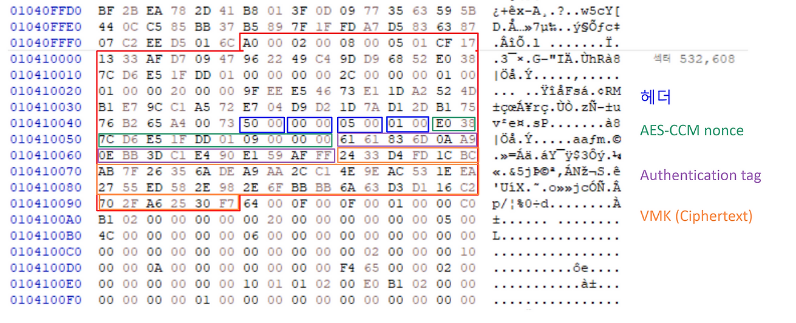
 The entry can be further decomposed into its child entries as shown below.
 The structure of the child entry can be analyzed as follows.
The Key Algorithm value is 0x2000, corresponding to AES-CCM 256-bit encryption.
The following 32-byte value is the Clear Key. It can be used to decrypt the 50-byte child entry contained within this VMK entry.
The recovered Clear Key matched the value produced by another encryption-recovery tool.
 The 50-byte child entry contains the VMK and can be decrypted using the Clear Key recovered above.